
Download Maya Tz’ib’ – Maya Tz’ib’, Mayan languages, keyboard layout, digital preservation, cultural heritage, Windows, typing tool, linguistic diversity, Guatemala, Mayan script
Overview
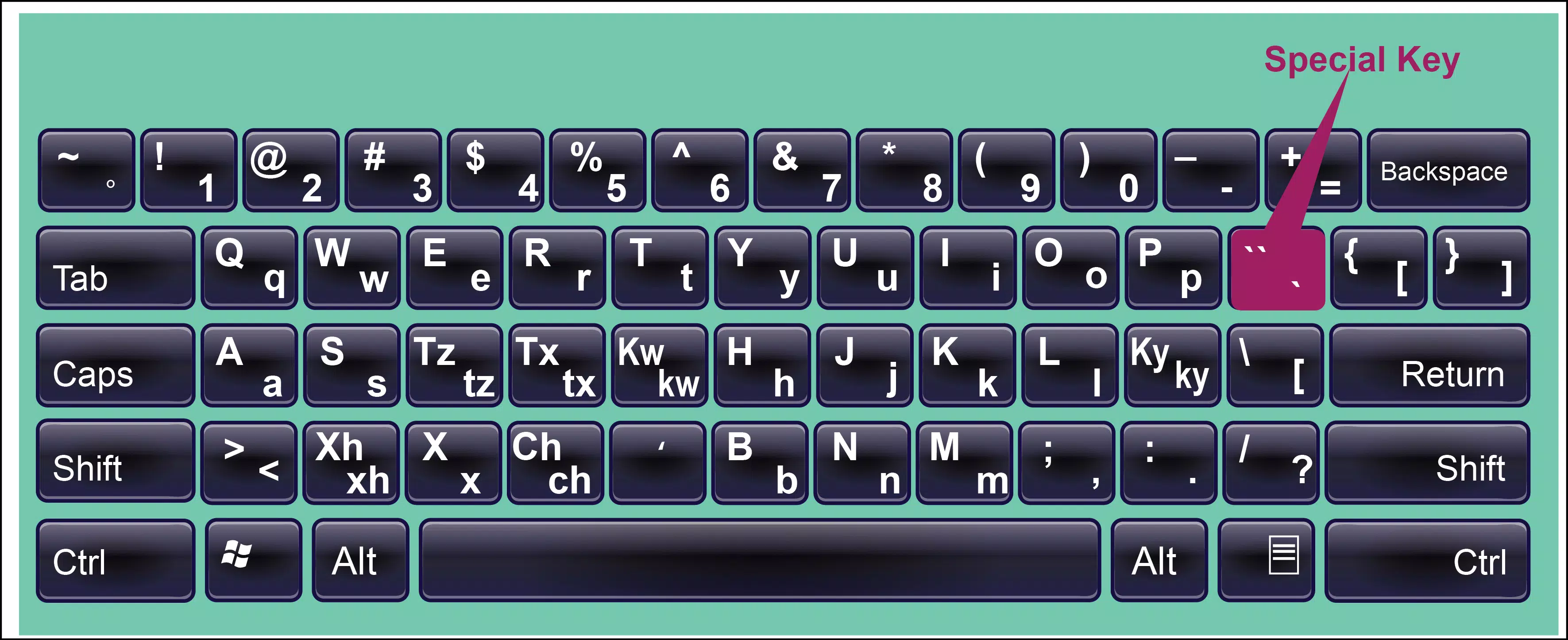
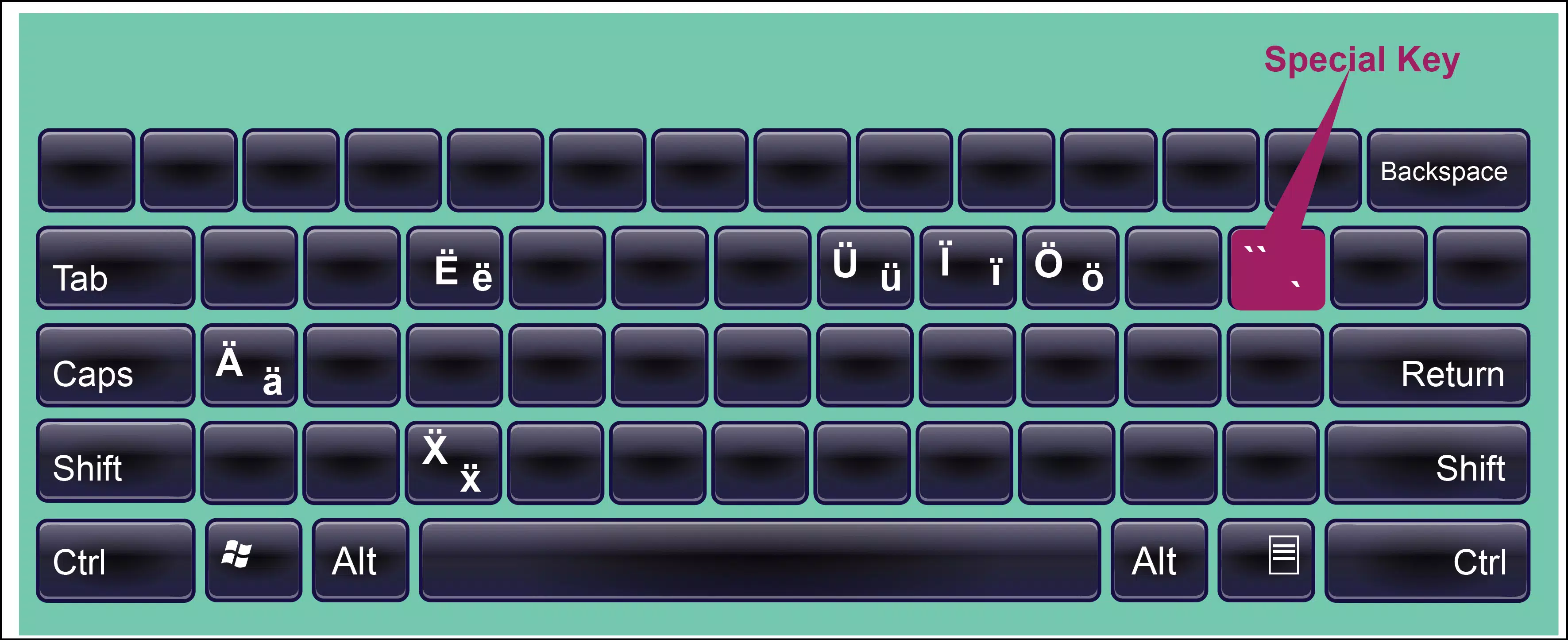
The Maya Tz’ib’ keyboard layout is a purpose-built digital tool designed to support the typing and digital expression of Mayan languages within Windows environments. Developed as part of a broader cultural initiative, this application enables users to input characters from various Mayan languages, promoting linguistic inclusivity and digital accessibility for communities in Guatemala and beyond. The app addresses a critical gap in digital infrastructure by providing a standardized keyboard layout that accommodates the unique phonetic and orthographic needs of multiple Mayan language variants.
Target users include native speakers of Mayan languages, language educators, cultural advocates, and digital content creators seeking to preserve and share their heritage. By integrating seamlessly into standard Windows applications, Maya Tz’ib’ allows users to compose documents, messages, and online content in their native tongues, contributing to the normalization of these languages in digital spaces. This functionality supports real-world use cases such as educational materials, community communication, and digital archiving efforts.
The developer, Maya Tz’ib’, has positioned this tool as part of a larger movement toward digital preservation and cultural empowerment. While specific organizational background is not detailed, the app’s focus on linguistic diversity and community-driven development reflects a commitment to grassroots cultural sustainability. In the broader app ecosystem, Maya Tz’ib’ fills a niche role by offering a lightweight, specialized utility that enhances digital representation for underrepresented languages.
Key Features & Functionality
- Multiple Language Support: The keyboard layout supports typing across several Mayan languages, enabling users to switch between dialects within a single application. This feature is particularly valuable for multilingual communities and language learners who need to engage with different linguistic variants.
- Cultural Preservation Initiative: By facilitating the use of Mayan languages in digital communication, Maya Tz’ib’ contributes to the long-term sustainability of these languages. It helps document and standardize usage patterns, supporting efforts to create digital archives and educational resources.
- User-Friendly Installation: The layout is designed for straightforward setup on Windows systems, requiring only basic administrative access. This ensures that users can activate the keyboard without advanced technical knowledge, lowering the barrier to entry for community adoption.
- Empowers Linguistic Diversity: The tool is inclusive by design, serving native speakers, students, researchers, and cultural advocates. Its availability promotes equitable access to digital tools for non-dominant languages, reinforcing the importance of linguistic pluralism.
- Contributes to a Cultural Movement: Using Maya Tz’ib’ is more than a technical action—it is an act of cultural affirmation. Each typed message, document, or post becomes part of a growing digital presence for Mayan languages.
For example, a teacher in Guatemala could use the keyboard to create classroom materials in Q’eqchi’ or K’iche’, while a researcher might use it to transcribe oral histories. A student learning Mayan languages can practice typing in authentic scripts, reinforcing both literacy and identity.
Interface, UX & Performance
As a keyboard layout utility, Maya Tz’ib’ operates within the Windows system settings and does not include a standalone user interface. Its functionality is accessed through the operating system’s language and keyboard management tools, ensuring a clean and minimal user experience. The design prioritizes efficiency and accessibility, avoiding unnecessary visual clutter.
Navigating the keyboard setup is straightforward: users can add the layout via the Windows Language Settings menu and switch between input methods using standard keyboard shortcuts. This integration supports a seamless workflow, especially for users who frequently switch between languages or input systems.
Although the developer did not list formal performance metrics, the lightweight nature of the app—1.5 MB in size—suggests minimal impact on system resources. It is expected to function reliably across a range of Windows devices, from entry-level machines to high-performance systems. Responsiveness is likely to be consistent, as the layout operates at the system level without requiring background processes.
Stability appears to be a strength, given the app’s focus on a single, well-defined purpose. No reports of crashes or conflicts were noted in available documentation. The absence of a visible interface reduces potential points of failure, contributing to overall reliability.
Platform Compatibility & Technical Requirements
Maya Tz’ib’ is designed exclusively for the Windows operating system. The app is compatible with Windows versions that support custom keyboard layouts, though specific OS requirements were not disclosed by the developer. Users are advised to ensure their system meets standard Windows language configuration capabilities.
The application size is 1.5 MB, making it a lightweight download suitable for users with limited bandwidth or storage. The file is distributed as a free tool, with no cost associated with installation or use. The current version is 1.0.0, indicating a stable initial release.
Compatibility information was not fully disclosed. While the app is intended for Windows, the developer did not specify minimum OS versions or hardware requirements. Users should verify their system’s ability to handle language-specific input methods before installation.
Pros and Cons
Pros
- Free to download and use, making it accessible to all users.
- Lightweight design with minimal system impact.
- Supports multiple Mayan languages, enhancing linguistic inclusivity.
- Contributes to cultural preservation and digital representation.
- Easy integration into standard Windows environments.
Cons
- Platform limited to Windows; no availability on mobile or macOS.
- Installation requires elevated privileges, which may limit use on restricted systems.
- Developer did not provide detailed technical specifications or system requirements.
- Limited to keyboard input; no additional language tools or learning features included.
- No visible interface or in-app guidance beyond standard OS settings.
FAQ
Is Maya Tz’ib’ safe to install on my Windows device?
Yes, the app is free and designed for Windows systems. As a keyboard layout tool, it does not include executable code that could pose security risks. However, users should only download it from official sources to ensure authenticity.
Can I use Maya Tz’ib’ on my mobile device?
Currently, the app is only available for Windows. There is no version for Android or iOS devices. Users seeking mobile support may need to explore alternative solutions or wait for future updates.
Do I need to pay to use Maya Tz’ib’?
No, the app is completely free. There are no in-app purchases, subscriptions, or hidden fees. It is available at no cost to support cultural preservation efforts.
How do I install Maya Tz’ib’ on my computer?
Installation requires administrative access. Users can typically add the keyboard layout through Windows Settings > Time & Language > Language > Preferred languages > Add a keyboard. The developer may provide an installer package, but specific instructions were not detailed.
Is Maya Tz’ib’ updated regularly?
While the current version is 1.0.0, the developer has not provided information on update frequency. Users should monitor official channels for announcements about new features or improvements.
Final Thoughts
Maya Tz’ib’ stands as a meaningful contribution to the digital preservation of Mayan languages. More than just a typing tool, it is a symbol of cultural resilience and linguistic pride. By enabling authentic expression in digital spaces, it empowers individuals to reclaim their language in the modern world. Its simplicity, affordability, and focus on inclusivity make it a powerful resource for educators, community members, and advocates of linguistic diversity.
While its platform is limited to Windows and lacks advanced features, its core purpose is fulfilled with precision. For users in Guatemala and the broader Mayan diaspora, this app offers a direct way to participate in a vital cultural movement. It bridges the gap between tradition and technology, ensuring that Mayan languages remain relevant in the digital age.
Download Maya Tz’ib’ now and become part of a growing effort to protect and promote one of the world’s most vibrant linguistic heritages.


